
Build your FF&E spec
from scratch.
Specfolio gives commercial fit-out teams a single platform to build specifications from your suppliers' products, import tenders, pin to floorplans, manage margins, swap alternatives in one click, and share with clients. All without a single spreadsheet.
The Problem
You're still doing this manually?
Most spec teams spend days building product schedules across scattered spreadsheets, chasing supplier prices, and reformatting everything for every client presentation. It doesn't have to be this way.
Building specifications from scratch in Excel, one row at a time
Build your entire spec from your suppliers' products in one place, or import a tender and let AI parse it for you
Manually calculating margins and sell prices
Set project-level or per-item margins that auto-calculate client pricing
Emailing PDF schedules back and forth for client sign-off
Share a live, branded spec book link where clients comment in real time
How It Works
From Brief to Client Presentation in Five Steps
Build
Start a new project and build your specification from scratch using products from your suppliers, all in one place.
Import
Already have a tender? Upload it and let AI extract every line item, quantity, and spec detail into structured data.
Specify
Match items to your product library. Set quantities, variants, finishes. Pin to spaces on your floorplan.
Price
Apply margins per project or per item. Specfolio calculates sell prices, VAT, and budget tracking automatically.
Share
Generate a branded, interactive spec book link. Clients view products, floorplans, and leave comments.
Build from scratch.
All your suppliers, one place.
Start a new project and build your entire FF&E specification using products from your curated supplier library. Browse by category, search by name or manufacturer, and add items with quantities, finishes, and variants. No import required. Your product library is the single source of truth across every project.
- Browse and add products from your supplier library directly
- Set quantities, variants, and finishes per line item
- Organise items by space: reception, boardroom, breakout, and more
- Combine with AI tender import on the same project
- No spreadsheet needed, build everything inside Specfolio

Apex Task Chair
£485
Hub Poseur Table
£920
Mellow Sofa
£2,140
Drag & drop your
go-to furniture.
Your most-used products are always within reach. Drag your favourite task chairs, desks, and soft seating straight from your product library into any specification. no searching, no scrolling. Specfolio learns which items you reach for most and keeps them front and centre.
- Drag products directly from your library into a project spec
- Frequently-used items surfaced automatically at the top
- Drop onto a specific space: reception, breakout, boardroom
- Quantities, variants, and pricing applied instantly on drop
- Works alongside search, browse, and AI import workflows
Already have a tender?
Import it with AI.
Upload any Excel, CSV, or PDF tender document. Specfolio's AI reads Revit schedules, architectural furniture plans, and traditional BOQs, extracting product names, quantities, dimensions, finishes, and manufacturers into structured specification lines.
- Parses Revit furniture schedules, Excel BOQs, and PDF specs
- Automatically matches extracted items to your product library
- Handles dimensions, finishes, and manufacturer data
- Review and confirm before committing so you stay in control
- Trainable AI: teach it your rules with custom prompts
View alternatives.
Select in one click.
Every specification line can be swapped for a better-fit alternative by preferred supplier, budget target, or category match. Specfolio scans your entire product library, compares pricing, dimensions, and sustainability ratings, then presents side-by-side options you can accept or dismiss instantly.
- Switch by supplier to consolidate orders with a preferred vendor
- Switch by budget to hit a target spend without manual recalculation
- Side-by-side comparison of current vs suggested product
- One-click accept to swap the line item across the entire project
- Savings summary showing total cost impact before you commit
Current Selection
Apex Mesh Task Chair
£485.00 · Qty 24
Total: £11,640.00
Alternative 1
Studio Ergonomic Pro
£410.00 · Qty 24
Total: £9,840.00
Alternative 2
Evo Flex Operator Chair
£435.00 · Qty 24
Total: £10,440.00
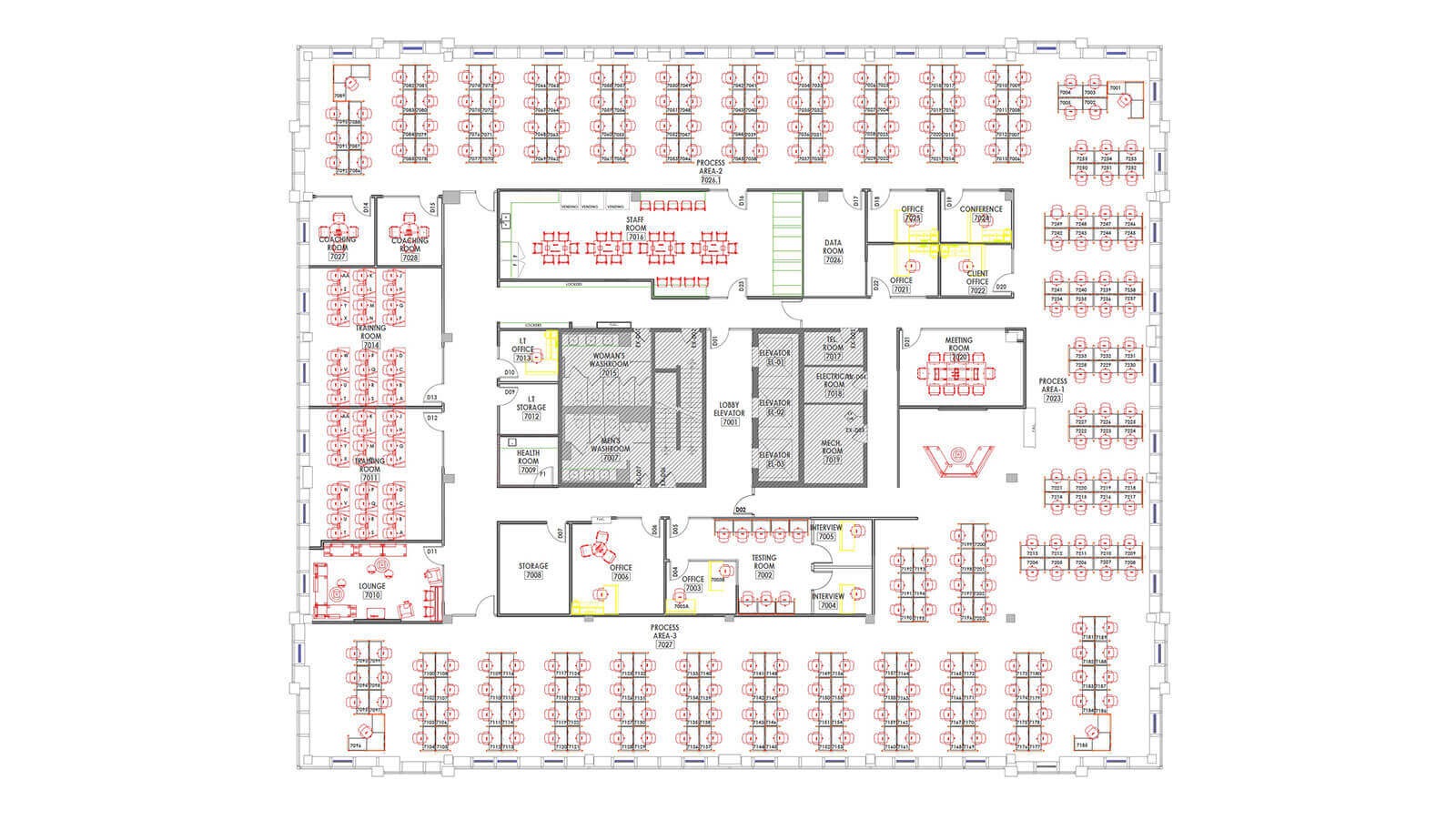
Pin every item
to the floorplan.
Upload floorplans and renders, then drag-and-drop pins to show exactly where each spec item goes. Clients click any pin to see the product, price, and image with no more cross-referencing separate schedules and drawings.
- Upload multiple floorplans and renders per project
- Click any pin to view the spec item zoomed in
- Export annotated floorplans as branded PDFs
- Clients see pins on the shared link, fully interactive
A presentation your
clients will remember.
Share a single link. Your client gets a branded, interactive spec book with tabbed views for renders, floorplans, and specifications. They can switch between card and table views, see product images, dimensions, and leave comments. all without needing an account.
- Branded with your logo, colours, and company details
- Tabbed sections: Renders, Floorplans, Specifications
- Card or table view, client chooses their preference
- Real-time commenting on individual spec items
- AI-suggested alternatives shown alongside your picks
- Print-ready so clients can print directly from the link

Shared Spec Book
specfolio.app/share/abc123

350+
Products
1,300+
Variants
16
Categories
Your products.
Every variant. Every finish.
Build and manage your curated product library with full variant support. materials, frame colours, upholstery fabrics, and size options, each with their own price adjustment. Research new products with the browser Web Clipper without leaving the manufacturer's website.
- Full product variants: material, colour, size with price adjustments
- Web Clipper bookmarklet to save products while browsing supplier sites
- Dimensions, lead times, fire ratings, warranties stored per product
- Fabric library with colour variants and imagery
- Supplier database linking products to your preferred suppliers
Plan Clerkenwell
showroom tours.
Clerkenwell is the heart of London's design district, home to over 60 furniture and materials showrooms within walking distance. Specfolio helps you plan efficient showroom tours for your clients, mapping the route between relevant showrooms based on the products in your specification, so you can touch, feel, and sign off in person.
- Map showroom visits based on your project's specified products
- Plan walking routes across Clerkenwell's design district
- Link showroom visits to specific spec line items for context
- Share the tour itinerary with clients ahead of the visit
- Capture notes and photos during visits and attach to spec items

60+
Showrooms
< 1 mi
Walking Dist.
200+
Design Brands
Protect your margins.
Track every pound.
Set a default margin at project level, then override per-item where needed. Specfolio automatically calculates sell prices for client-facing documents while keeping your cost prices private. Budget tracking shows spend versus allocation at a glance.
Project-Level Margins
Set once, apply everywhere
Per-Item Overrides
Fine-tune where it matters
VAT Toggle
Show ex-VAT or inc-VAT pricing
Budget Tracking
Live spend vs. allocation
Export Preview
Summary
Company branding, project details, financial overview
Specifications
Full product list with images, dimensions, pricing
By Space
Items grouped by area (reception, boardroom, etc.)
Product Images
All product photography in one reference sheet
Export to Excel.
Send to suppliers.
Download a multi-sheet Excel workbook with your branding, financial summary, specifications by space, and product imagery. Or use the Tender Builder to compile supplier requests, attach your product selections, and send directly from Specfolio.
- Branded Excel export with 4 professional sheets
- Sell prices with margins so you never share cost data accidentally
- Tender Builder to compile and send supplier requests
- Annotated floorplan PDF export with pin labels

Complete Platform
Everything Else You'd Expect
Supplier Database
Manage contacts, ratings, and preferences
Space Management
14 area types from reception to outdoor
Fabric Library
Fabrics with colour variants and imagery
Custom Branding
Your logo, colours on every client document
VAT Handling
Toggle ex-VAT/inc-VAT per item or project
Excel Export
Multi-sheet branded workbook download
Team Dashboard
Overview of all projects, budgets, activity
Trainable AI
Custom rules and prompts for your workflow
Your next project deserves
better than a spreadsheet.
See how Specfolio can transform the way your team builds FF&E specifications. from first brief to client sign-off.